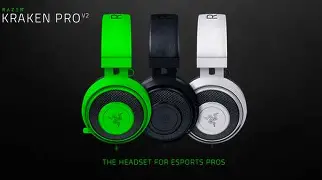
Kraken Pro V2 Review: Real User Experience After 3 Months
Audio — Long-term hands-on with the Kraken Pro V2
I've been using the Kraken Pro V2 as my daily headset for about three months now. I bought it primarily for gaming, but I've also used it for music, video calls, and a fair amount of content consumption. What I found was a mix of clear strengths and some annoyances that only became obvious with regular use. In this review I’ll walk through build and comfort, sound performance across different uses, microphone experience, compatibility, software ecosystem, everyday practicalities, and whether it’s a good buy depending on how you plan to use it.
Why I chose the Kraken Pro V2
I wanted a wired headset with a solid soundstage for FPS games, a comfortable fit for marathon sessions, and a microphone good enough for voice chat without needing a separate mic arm. The Kraken Pro V2 checked those boxes on paper — affordable, over-ear design, and the reputation of a solid gaming headset — so I picked one up and started putting it through real-world use.
Unboxing and first impressions
Right out of the box, the Kraken Pro V2 felt lightweight but substantial. The packaging was minimal and the headset arrived in good condition. Initial fit was snug — not painfully tight — and the earcups felt plush. I appreciated that setup was as simple as plugging into a 3.5mm jack; I tested on a desktop, a laptop, a PS5 controller, and my phone with an adapter when needed.
Build quality and comfort (what I noticed after daily use)
In my experience the Kraken Pro V2 balances plastic construction with metal reinforcement in the headband. After three months of daily wear, I noticed the following:
- Comfort: The memory foam ear cushions are soft and the oval cups sit around my ears rather than squashing them. I can wear these for 2–3 hour sessions without serious discomfort. After longer sessions (4+ hours) my ears start to feel warm — expected for closed-back over-ear cups.
- Clamp force: The clamp is firm enough to keep the headset stable during movement, but not so tight that it causes headaches. It relaxed slightly over time, which made long sessions more comfortable.
- Durability: The plastic feels sturdy and the headband adjustment is smooth. I did notice some minor finish wear where the headband meets the yoke after a few weeks — cosmetic, not structural. My cable shows no fraying, but keep in mind heavy tugging could be an issue if you’re rough with it.
- Portability: It’s not foldable, so it’s bulkier in a bag than some competitors. If you commute or travel frequently, that’s worth considering.
Sound performance — gaming, music, and media
Sound is where this headset lives or dies for most users. I tested the Kraken Pro V2 in several scenarios and this is what I experienced.
Gaming
For FPS titles like Valorant and Call of Duty, the Kraken Pro V2 performed very well. The soundstage is reasonably wide for a closed-back headset, and directional cues are clear enough that I could locate footsteps and gunfire with confidence. The bass is present and punchy, which makes explosions and in-game impacts satisfying without overwhelming voices or footsteps.
What I appreciated was the midrange clarity — gun reports and character voices come through naturally. There’s a slight warmth to the overall signature; it never felt overly bright or fatiguing during long sessions. If you’re a competitive player who prioritizes absolute pinpoint accuracy, you might prefer a headset with a flatter, more analytical tuning, but for most gamers the Kraken Pro V2 strikes a good balance between immersion and positional clarity.
Looking for the best Audio & Headphones deals on Amazon?
Browse Now →Music
In my experience the Kraken Pro V2 is enjoyable for casual music listening. Pop, electronic, and rock tracks come across with satisfying bass impact and clear highs. However, audiophiles will notice some limitations: the detail retrieval and instrument separation aren’t on par with higher-end studio or audiophile headphones. Vocals sit comfortably in the mix, but complex orchestral pieces can feel a bit congested compared to open-back headphones or premium closed-back models.
Movies and streaming
Movies benefit from the bass and the overall immersive tuning. Dialogue is clear, which made streaming shows pleasant without constantly reaching for the volume. The headset does a good job conveying low-end weight (car chases, explosions) that adds cinematic punch.
Microphone performance — real-world voice clarity
The Kraken Pro V2 microphone is decent for in-game chat and quick calls. In my experience:
- Voice clarity: My teammates reported that my voice sounded clear and present. It picks up the midrange of my voice well, so I don’t need to speak loudly to be heard.
- Background noise: It’s not a noise-cancelling mic; it will pick up keyboard clicks and ambient room noise if you’re in a noisy environment. In a quieter room it’s fine, but don’t expect studio-level isolation.
- Mute and placement: The boom mic is flexible and easy to position. When flipped up it mutes reliably (depending on your platform), which is handy for quick mute toggles.
One thing I noticed: the mic can sound slightly nasally on some voice chat platforms until you adjust input levels. If you spend a lot of time streaming or recording, a standalone USB mic will still be noticeably better.
Compatibility and practical use
Because the Kraken Pro V2 is analog with a 3.5mm connection, it’s widely compatible — PC, Mac, consoles, and mobile devices. I used it plugged into a gaming controller, laptop, and an audio interface (with an adapter), and it worked without fuss. On PC you can use software EQ or onboard sound card features to tweak the sound, but there isn’t a proprietary USB dongle or advanced DSP built into the headset itself, which means out-of-the-box tuning is what you get unless you apply external EQ.
I appreciated the simplicity: no charging, no wireless pairing, and no latency issues. For console players, plugging into the controller works instantaneously and reliably.
Software and customization
The Kraken Pro V2 I used didn’t include a dedicated USB sound card model, so the on-headset functionality is largely hardware-driven. That simplicity is a plus for people who dislike software bloat, but it’s a downside if you want built-in virtual surround or fine-grain DSP. I used third-party EQ presets and my sound card’s software when needed and found that a small EQ tweak to reduce a slight mid-bass emphasis polished the sound for music without compromising gaming impact.
Shop the latest Audio & Headphones picks on Amazon.
Browse Now →Everyday usability — cable, controls, and noise isolation
- Cable: The cable length is generous for desktop use. I ran it across my desk and it reached my tower comfortably. If you plan to use it with a phone in your pocket, expect some cable management to avoid snagging.
- Controls: There aren’t many inline controls — mostly just the mic mute and volume control via your device. That keeps the design simple but means mic toggles depend on device support.
- Noise isolation: The closed-back cups isolate a fair amount of external noise, which is helpful in a shared apartment or during transit. It’s not active noise cancellation; it blocks physical noise passively.
What I liked and what bothered me (honest take)
- What I liked:
- Comfortable ear cushions for long sessions.
- Strong bass and engaging sound for gaming and movies.
- Wide compatibility via 3.5mm plug — works with consoles and mobile devices easily.
- Lightweight design that stays comfortable through marathon sessions.
- What bothered me:
- Mic picks up background noise more than I expected in louder environments.
- Lack of onboard software or USB DAC means some features (virtual surround, EQ presets) require third-party tools.
- Non-folding design makes it less travel-friendly.
- Minor cosmetic wear showed up after a few weeks in high-contact areas.
Pros & Cons
- Pros:
- Comfortable for extended sessions
- Strong bass and immersive gaming sound
- Plug-and-play simplicity with broad compatibility
- Reasonably durable build for everyday use
- Cons:
- Microphone not ideal in noisy environments
- No built-in software/DSP for tuning
- Does not fold for compact storage
- Detail retrieval lags behind higher-end or audiophile headsets
Comparison — Kraken Pro V2 vs. similar headsets
| Feature | Kraken Pro V2 | HyperX Cloud II (reference) | SteelSeries Arctis 7 (reference) |
|---|---|---|---|
| Connection | Wired 3.5mm | Wired 3.5mm / USB (with dongle) | Wireless 2.4GHz (USB) |
| Comfort | Plush memory-foam, good for long sessions | Very comfortable, slightly firmer clamp | Lightweight, comfortable for long sessions |
| Mic quality | Clear in quiet rooms, picks up background noise | Generally better isolation and fuller tonality | Good, with Discord-certified clarity |
| Sound signature | Warm, bass-forward, immersive | Neutral-warm, balanced | Balanced with virtual surround options |
| Extras | Minimal — no built-in DSP | USB sound card available on some SKUs | Wireless freedom, software customization |
| Best for | Gamers who want punchy sound and comfort | Users wanting a comfortable, balanced headset | Users wanting wireless and software features |
Buying guide — Is the Kraken Pro V2 right for you?
When I think about who should consider the Kraken Pro V2, I break it down into a few decision points based on my experience:
Choose Kraken Pro V2 if:
- You're a wired gamer who values immersive bass and comfortable earcups for long sessions.
- You want something plug-and-play that works with consoles and mobile devices without adapters or drivers.
- You prefer a simple headset without the need for software or wireless charging.
Look elsewhere if:
- You frequently record or stream and need a microphone with studio-level clarity or strong background noise rejection.
- You want a headset with built-in DSP, virtual surround, or a wireless connection out of the box.
- You travel often and need a foldable, compact headset for portability.
What to check before buying
- Compatibility: Make sure your primary device supports the 3.5mm connection or that you have the right adapters.
- Return policy: Because comfort and mic performance are subjective, verify the seller’s return policy so you can try it risk-free.
- Warranty: Check the warranty period and what it covers for defects versus cosmetic wear.
- Optional accessories: If you want virtual surround or EQ presets, prepare to use third-party software or consider a different SKU that includes a USB DAC.
Final verdict — My conclusion after 3 months
After three months of daily use, the Kraken Pro V2 has become my go-to wired headset for relaxed gaming and media. In my experience it's comfortable, delivers satisfying low-end impact for games and movies, and is compatible with every device I tried. The microphone is usable for casual voice chat, but I would not rely on it for streaming or professional recording without a backup mic.
What I liked most was the simple, no-nonsense approach: plug it in and it works, with a sound signature that enhances games and movies. What I found disappointing was the lack of built-in software features and the mic's sensitivity to background noise. Small cosmetic wear after regular handling was also mildly annoying, though it didn't impact performance.
If you want a comfortable, punchy wired headset for gaming with broad compatibility and minimal setup fuss, the Kraken Pro V2 is a solid choice in the mid-range category. If you prioritize mic performance, advanced software features, or wireless convenience, you might prefer alternatives that cater to those needs.
Overall, in my experience the Kraken Pro V2 delivers strong value for what it is: a comfortable, enjoyable wired gaming headset with a characterful sound. It’s not perfect, but for everyday gaming and media I’ve found it reliable and pleasant to use.